MFA
It is used only in the Applications that have an MFA agreement, and there are three authentication methods available: Google Authenticator (OTP), SMS, and Kaokaotalk Alim. In the case of SMS and Kaokaotalk Alim, it is only available for applications that have a separate contract with the SMS sending agent, Infobip. With the settings in Studio, for the sending method following Application standard,SMS and Kaokaotalk Alim, sending messages can be modified. In this case, for SMS and Kaokaotalk Alim, the authentication code expiration time and the verification code length can also be adjusted.
Note
A Authentication Code Expiration Time is a control used to set the validity period of verification code a minimum of 1 minute to a maximum of 30 minutes and Verification Code Length is a control used to set digits number of verification code from minimum of 2 digits to a maximum of 8 digit.
B For Application or Tenant, selecting authentication method is Message or Kaokaotalk Alim (Kakaotalk Alim), if there is no user phone number information of Application or Tenant, verification code cannot be sent. Therefore, the user needs to update phone number information before setting MFA.
- How To Create _Google Authenticator (OTP)

- Select OTP at
MFA optionandsave
Note:
For OTP, Authentication Code Expiration Time and Verification Code Length cannot be changed, therefore, the default information for Google Authenticator will be shown as Read Only. (Authentication Code Expiration Time(sec): 30, Verification Code Length: 6).
- How To Create _Message
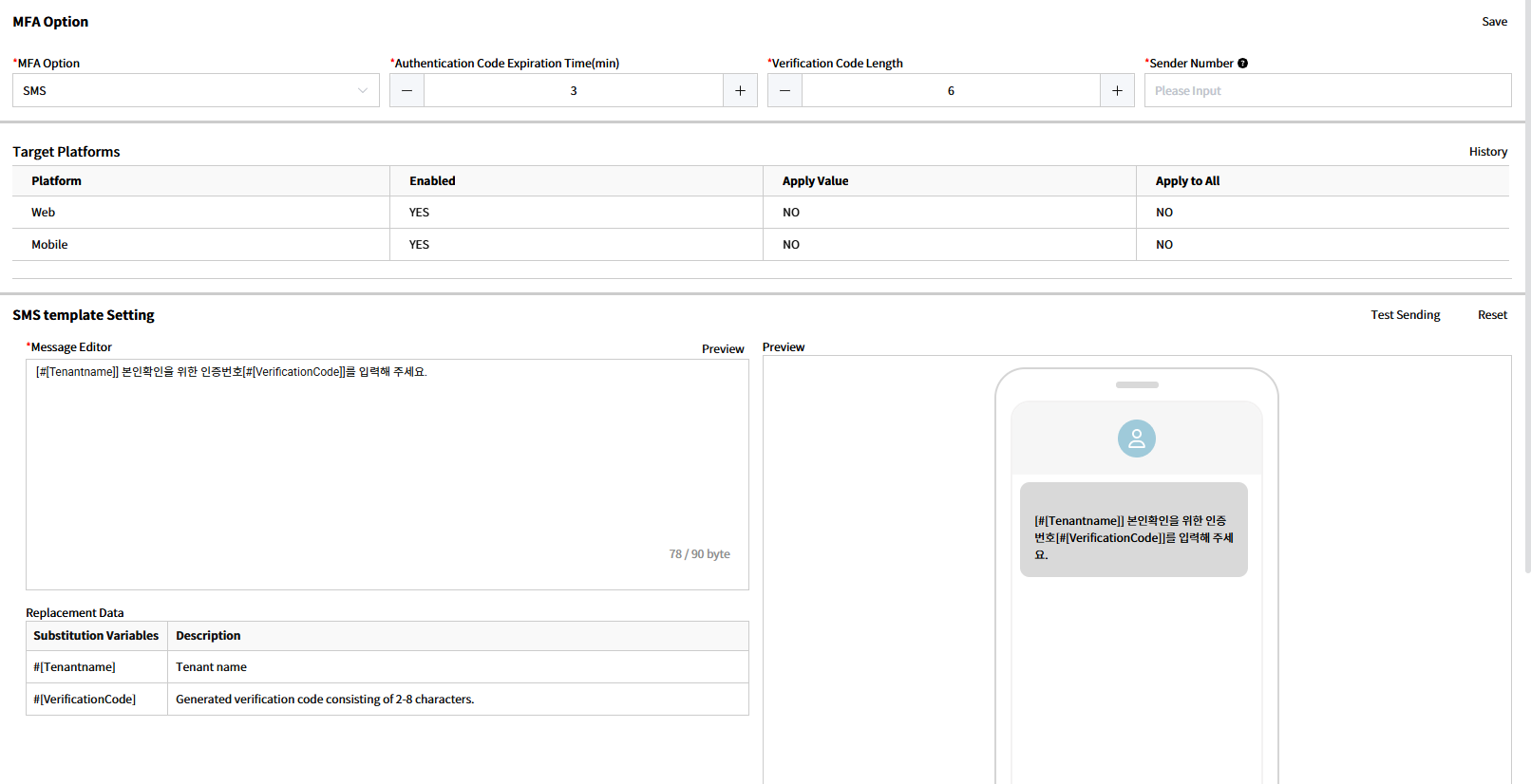
- Select
SMSinMFA Option. - Input Authentication Code Expiration Time(min) -validity period for verification code.
- Input Verification Code Length for verification code - digits number of verification code
- Input Sender Number to set phone number used to send message
- Select Platform to apply MFA settings.
- Enabled: Set whether to use the Platform. If set to No, the setting is not displayed in the Web Application.
- Apply Value: Set the value to apply when changing the setting value. (Yes=Use, No=Unused, N/A=Not set)
- Apply to All: Apply the setting value to all users registered in the Web Application at once. (Yes=Use, No=Unused, N/A)
- Check the default template in SMS Template Setting at the bottom of MFA Option and modify content in Message Editor if necessary.
- Press the
Previewbutton at the right top of the Message Editor, then check thePreviewscreen or use the Test Sending button to check how modified content will be received. - Press
Savebutton at the top right ofMFA Option.
Note:
A Authentication Code Expiration Time can be set from a minimum of 1 minute to a maximum of 30 minutes and Verification Code Length can be set from minimum of 2 digits to a maximum of 8 digit.
B In Sender Number field, input the phone number used when issuing the contract with Infobip.
C In the message body, for substitute message, only the message in the Replacement Data list can be used, when inputting, the user uses Mention called when input "#" and input data.
D Target Platform > Apply to All applies the setting value to all users at once, and the setting value cannot be reverted after application, so it must be used carefully.
E When Test Sending, the replacement characters in Replacement Data are replaced as follows:
- #[Tenantname] → Actual Tenant Name (Ex. educationAcc)
- #[Verification Code] → Display 1 as many as the set verification code digits (Ex. 111111 when set to 6 digits)
- How To Create Kakaotalk Alim
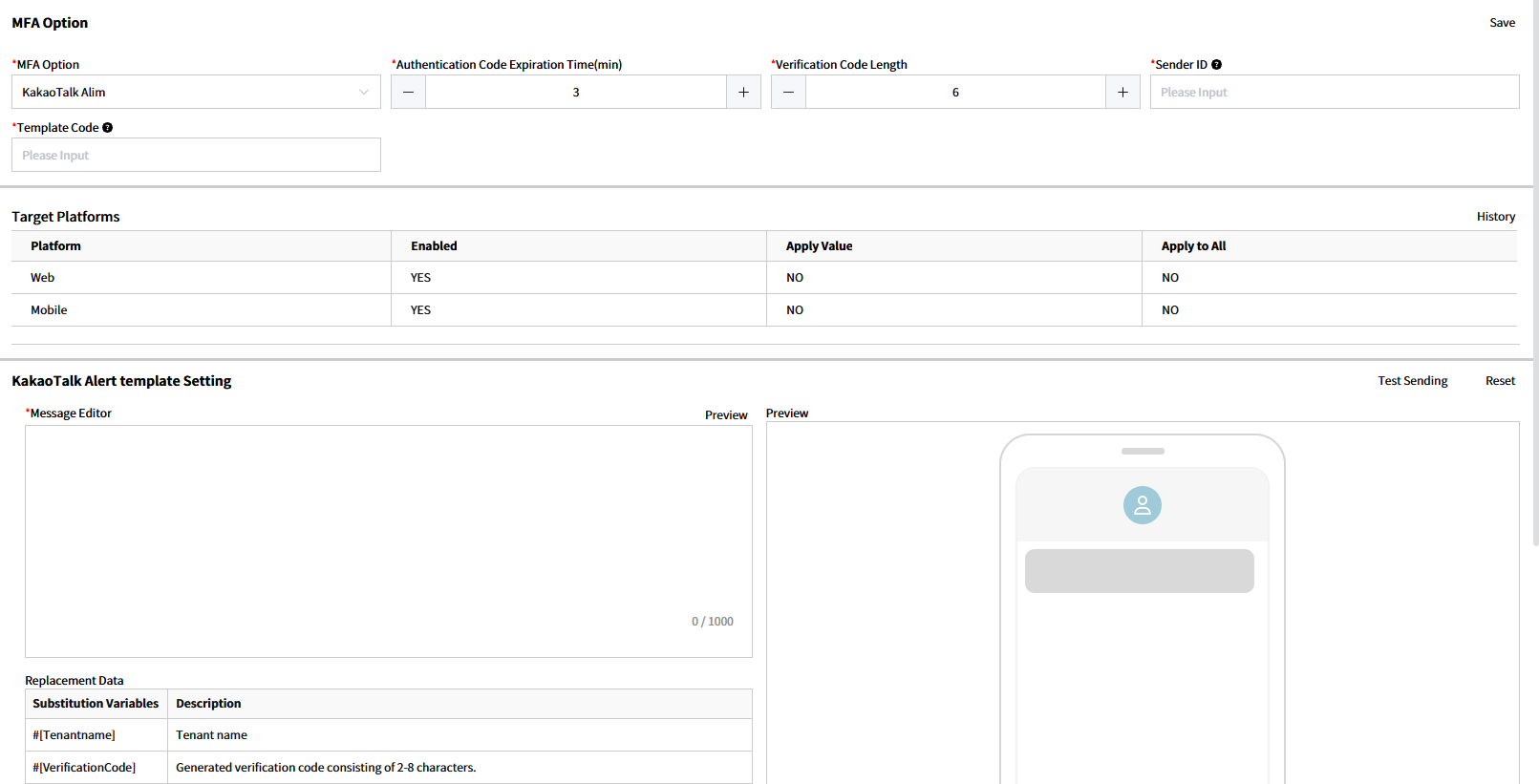
- Select Kakaotalk Alim in
MFA Option - Input Authentication Code Expiration Time(min) -validity period for verification code.
- Input Verification Code Length for verification code - digits number of verification code
- Input Kakaotalk Alim Sender ID sent from Infobip.
- Input template code registered in Infobip Kakaotalk Alim administration homepage.
- Select Platform to apply MFA settings.
- Enabled: Set whether to use the Platform. If set to No, the setting is not displayed in the Web Application.
- Apply Value: Set the value to apply when changing the setting value. (Yes=Use, No=Unused, N/A=Not set)
- Apply to All: Apply the setting value to all users registered in the Web Application at once. (Yes=Use, No=Unused, N/A)
- Kakaotalk Alim Template is the same as the Message registered in Infobip Kakaotalk Alim administration homepage. In this case, [#[Tenantname]] and [#[VerificationCode]] means tenant name and verification code based on Cals Platz substitution.
- After pressing the
Previewbutton at the top right of theMessage Editor, check thePreviewscreen or use theTest Sendingbutton to check how modified content will be received. - Press the
Savebutton at the right top ofMFA Optionand save.
Note:
A Authentication Code Expiration Time can be set from 1 to 30 minutes and Verification Code Length can be set from 2-8 digits.
B Target Platform > Apply to All applies the setting value to all users at once, and the setting value cannot be reverted after application, so it must be used carefully.